AI Study Assistant: How Students Actually Learn Faster (Without Cheating)
An AI study assistant is a learning tool that turns your own notes, slides, and recorded lectures into explanations, summaries, flashcards, and practice quizzes — and a study AI like StudyAI is built to help you understand the material, not hand in work you didn’t do. The U.S. Department of Education’s Office of Educational Technology makes a similar point about classroom AI generally: it works best when a human stays «in the loop,» using the technology to support learning rather than replace it. Think of a good AI tutor as a patient study partner who’s available at 2 a.m. before an exam — not a stand-in for the exam itself.

The distinction matters more than the feature list. Used well, an AI study tool makes the science-backed habits of active recall and spaced repetition almost effortless, because it generates the flashcards and quiz questions that used to take an hour to write by hand. Used badly, the same tool becomes a shortcut that skips the learning entirely. This guide walks through what these tools actually do, where the honesty line sits, and how to get real value out of one.
What an AI study assistant is (and isn’t)
Before comparing features, it helps to define the category plainly, because «AI study assistant» gets used loosely online to describe everything from a flashcard app to a full essay-writing bot.
A tutor, not a ghostwriter
An AI study assistant is software that uses a large language model to explain topics, condense material, and quiz you on what you just read or watched — the same underlying technology behind general-purpose chatbots, tuned toward a study workflow. That’s a different category entirely from an essay-writer or homework-doer, which produces finished work meant to be submitted as-is. An AI study helper supports your learning; it does not replace it. Millions of students already use tools in this category — public figures cited by competing products in this space run from the low hundreds of thousands up to 5 million-plus users — so the practical question for most students is no longer whether to use AI while studying, but how to use it without crossing into academic dishonesty.
Where it fits in a study session
In practice, an AI study assistant sits at the front of a study session, not at the end of one. You upload a lecture PDF, a recorded class, or your own messy notes, and the assistant returns a clean summary you can skim in a few minutes. From there you move into flashcards and self-testing — the part where the actual learning happens. A tool that stops at «here’s your summary» is only doing half the job; the half that matters for exam performance is the retrieval practice that comes after.
The core features that actually help you learn
Most AI study tools converge on the same handful of core features, even though the interfaces differ. What separates a genuinely useful one is whether each feature is built to make you do the recall, not just consume a cleaner version of the material.
Explain-it-to-me concept help. An AI tutor rephrases a hard idea at whatever level you actually need — «explain this like I’m new to the topic,» then «now walk me through it at exam level.» This is the feature that does the most for comprehension, because it responds to your specific confusion instead of giving you a generic textbook paragraph.
Summaries and notes. A study assistant condenses long readings or hour-long recorded lectures into structured notes you can review in minutes. Input formats vary by tool, but the strongest ones accept PDF, DOCX, audio (MP3), video (MP4), PowerPoint slides, and YouTube links — which matters because course material rarely arrives as clean typed text.
Flashcards plus spaced repetition. The assistant auto-generates flashcards from your material and schedules review sessions using spaced repetition, a technique — documented on Wikipedia’s spaced repetition entry — that spaces out review intervals so facts move from short-term memory into long-term memory instead of fading within a day.
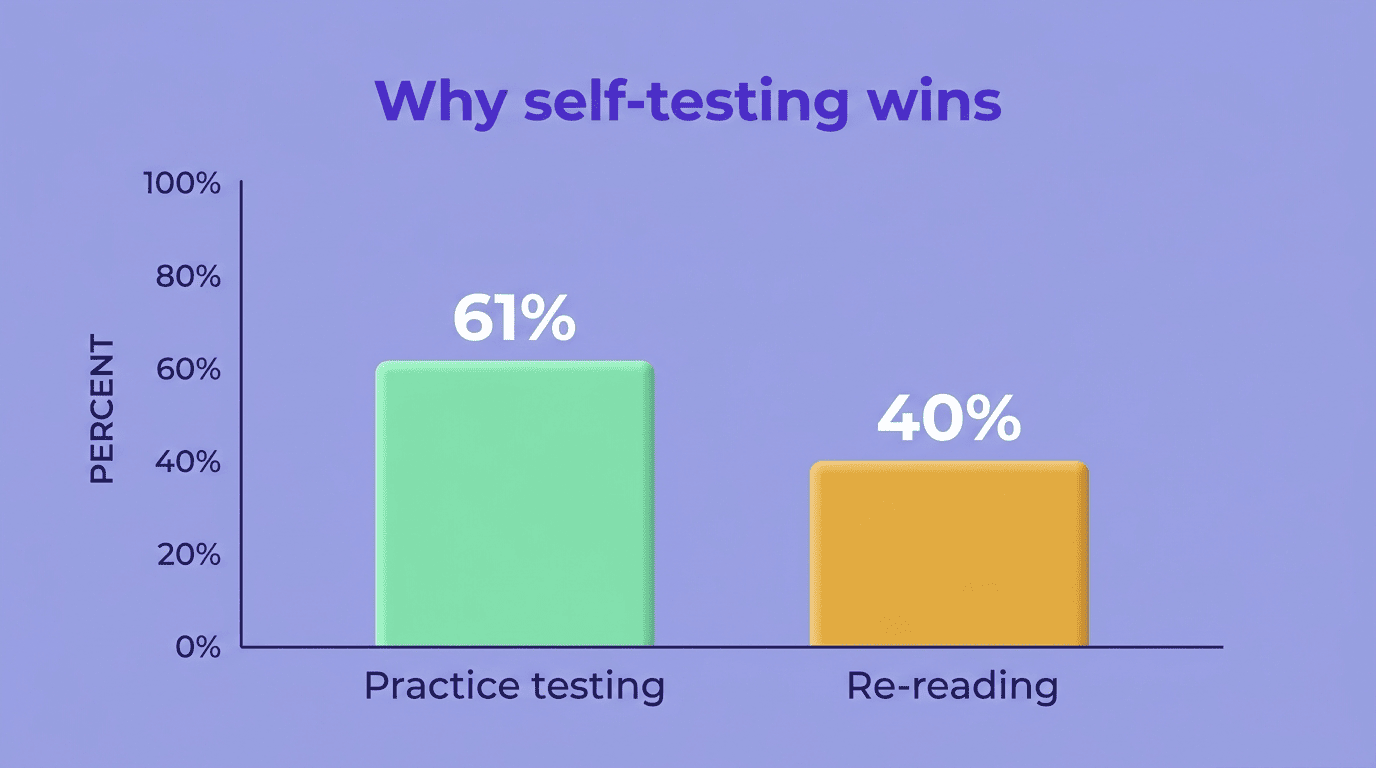
Practice quizzes and active recall. A good assistant can generate multiple-choice, true/false, and short-answer questions from your own notes. Testing yourself before the real exam is one of the highest-leverage study habits documented in learning science, an effect Wikipedia’s testing effect entry describes as retrieval practice consistently outperforming passive re-reading.
| Feature | What it does | Format(s) supported |
|---|---|---|
| Concept explanation | Rephrases a topic at your level, on request | Text, follow-up Q&A |
| Summaries / notes | Condenses lectures and readings into structured notes | PDF, DOCX, MP3, MP4, PowerPoint, YouTube links |
| Flashcards | Auto-generates cards, schedules spaced review | Text, PDF, slides |
| Practice quizzes | Multiple-choice, true/false, short-answer | Text, PDF, uploaded notes |
Learning, not cheating: the academic-integrity line
This is the section that separates a study tool worth trusting from one that quietly sets students up for a disciplinary meeting — and it deserves to be direct, not buried in fine print.
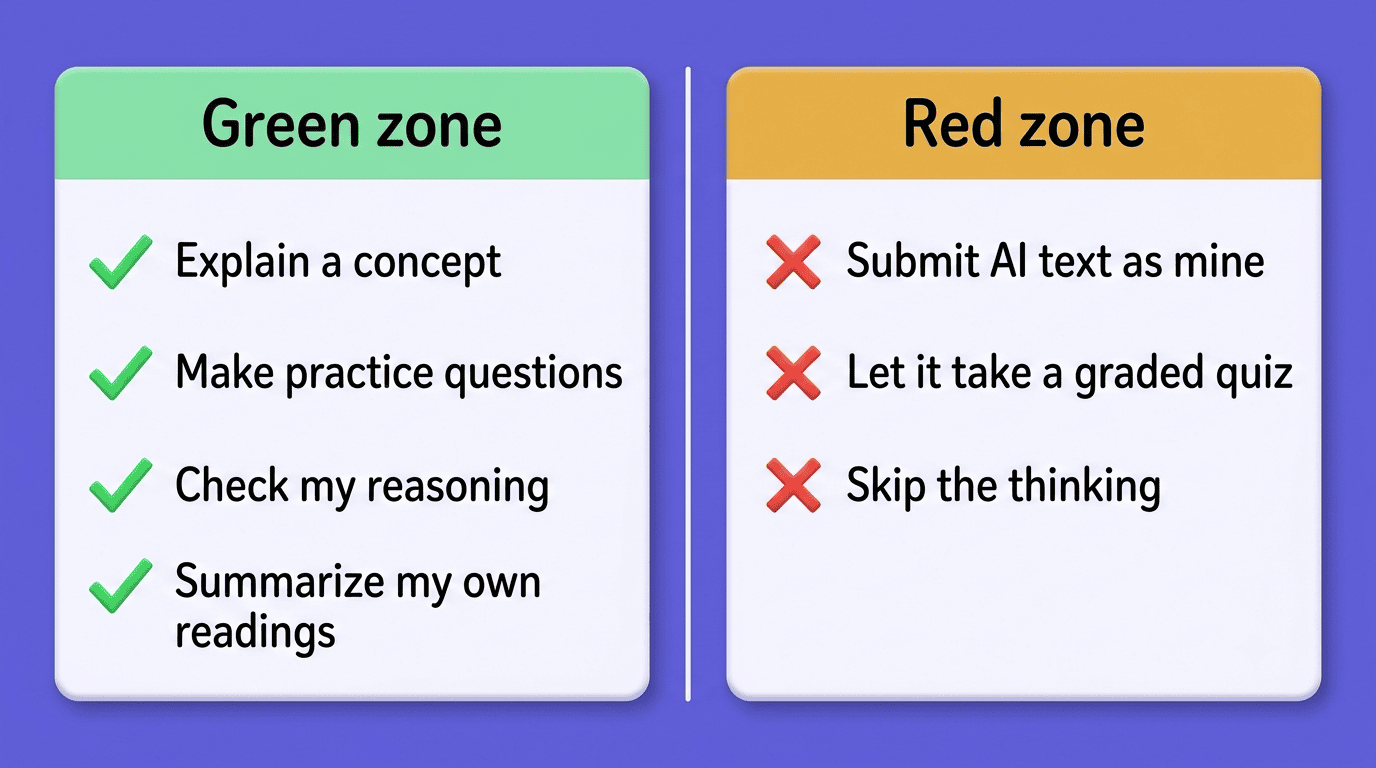
The green zone vs. the red zone
The honest way to think about it is a simple two-column test: is the tool doing your thinking, or checking it?
- Green zone: asking for an explanation of a concept you’re stuck on, generating practice questions to test yourself, checking your own reasoning against the material, summarizing your own readings to review before class.
- Red zone: submitting AI-generated text as your own written work, having the tool answer a graded quiz or exam for you, or using it to bypass the thinking a graded assignment is designed to require.
Academic integrity is a commitment, even in the face of adversity, to six fundamental values: honesty, trust, fairness, respect, responsibility, and courage.
International Center for Academic Integrity
Those six values, defined by the International Center for Academic Integrity, are what most university honor codes are built on — and they’re a useful check regardless of which specific course policy applies to you.
Check your course and school policy
Academic-integrity policies differ by instructor and by institution, and «AI is fine for practice but not for graded work» is a common split you’ll see written into a syllabus. Stanford’s Office of Community Standards, for example, spells out that using unauthorized assistance on an assignment intended to be independent work is a violation of the university’s honor code — a standard broadly similar to what most U.S. schools expect. Before using any AI tool on graded work, a quick three-step check keeps you clear of trouble:
- Read the AI-use clause in your syllabus, if your instructor included one.
- Check your school’s general academic-integrity policy for anything specific to AI tools.
- When the policy is unclear, ask the professor directly rather than guessing.
How to choose an AI study assistant
Picking a tool isn’t just about which one has the flashiest interface — a few criteria predict whether it will actually help on exam day.
What to look for
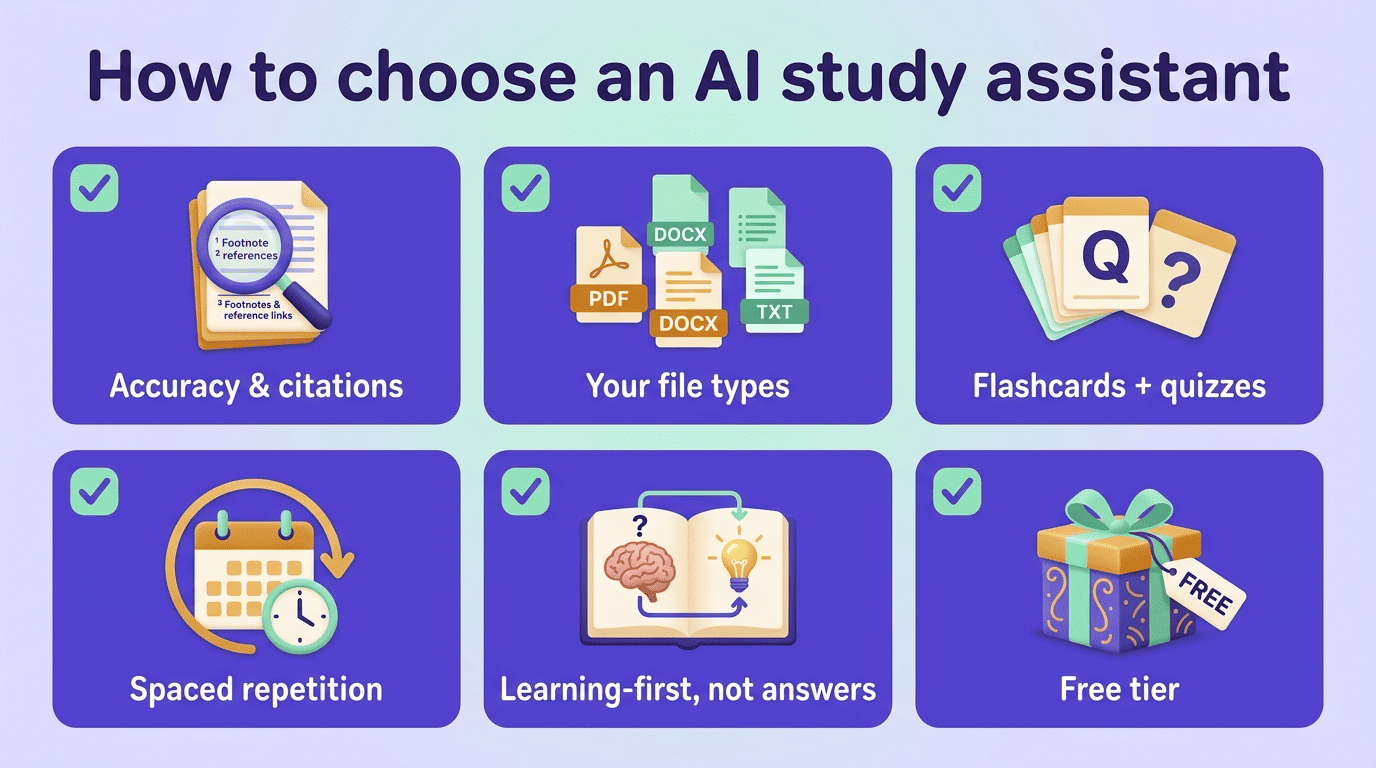
Accuracy and the ability to cite where a summary came from matter more than most students initially assume, because a confidently wrong explanation is worse than no explanation. Beyond that, check the file types it accepts, whether it generates both flashcards and quizzes (not just one), whether it supports spaced-repetition review scheduling, and — the criterion that matters most for long-term learning — whether the tool nudges you toward understanding rather than toward a copyable answer. Free-tier availability is also worth checking before you commit a semester’s workflow to a paid plan.
| Criterion | Why it matters |
|---|---|
| Accuracy / citations | A wrong summary is worse than no summary |
| Flashcards and quizzes | Covers both recognition and active recall |
| Spaced-repetition scheduling | Moves facts into long-term memory automatically |
| Nudges toward explanation, not answers | Keeps the tool in the green zone |
| Free tier | Lets you test the workflow before paying |
Red flags
Some tools in this space advertise features that should immediately raise doubt about the site’s intentions:
- Marketing that promises to «do your homework» for you.
- Features built specifically to «beat AI detectors.»
- No option to see the reasoning behind an answer — only the final answer itself.
- No mention of citations, sources, or where a summary’s facts came from.
Tools built around those promises are selling access to the red zone, not a study habit. Avoid them, even if they’re free.
Getting the most out of it (study technique)
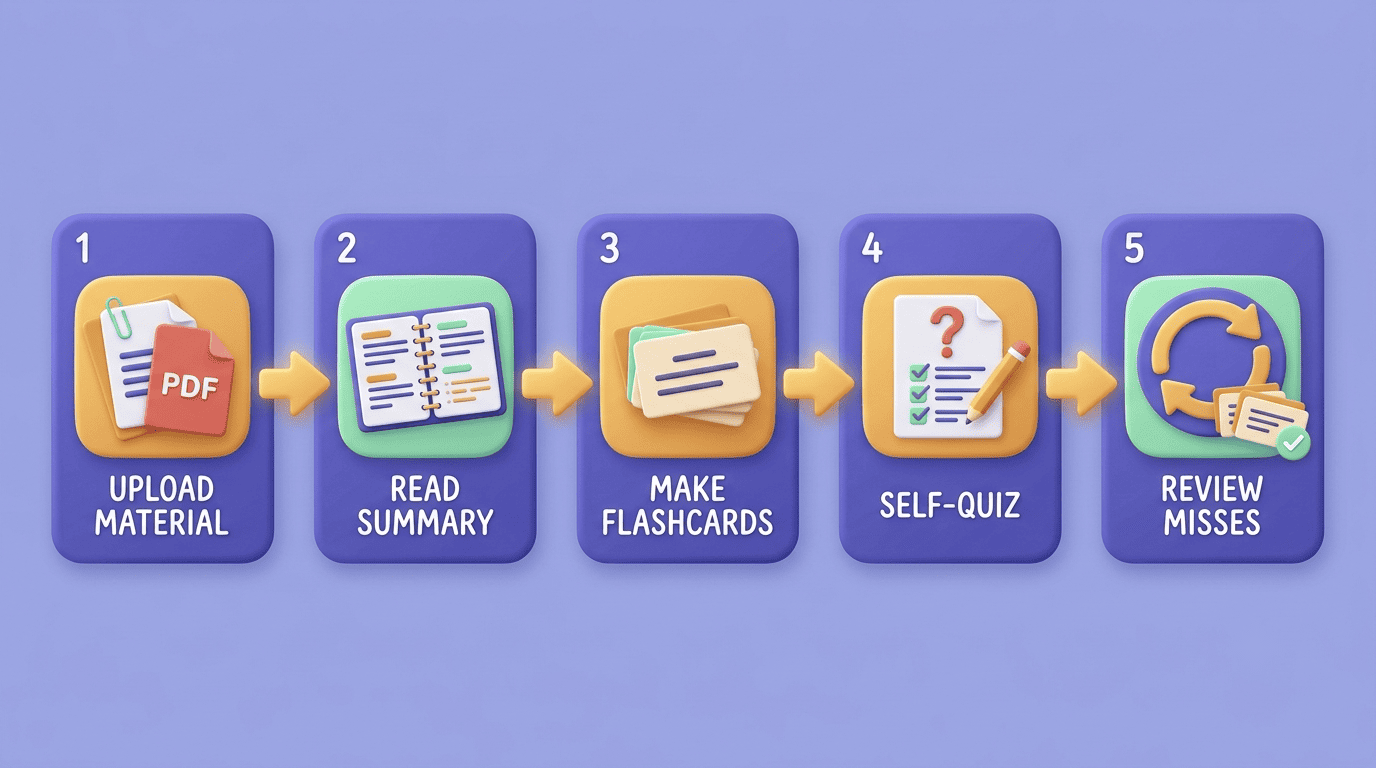
The tool matters less than the routine you build around it. A simple, repeatable exam-prep loop looks like this:
- Upload the material. A lecture recording, a PDF chapter, or your own typed notes.
- Read the summary first. Skim it once for the overall shape of the topic before drilling into detail.
- Generate flashcards. Let the assistant pull the key facts and terms into cards automatically.
- Self-quiz. Take the generated practice quiz with the material closed, not open in another tab.
- Review misses on a spaced schedule. Come back to anything you got wrong a day or two later, then again a week later.
- Explain it back. Use the study AI tool to re-explain every question you missed until you could teach it to someone else without notes.
That loop — summarize, generate, self-test, space out the review — is what turns a study assistant from a convenience into an actual improvement in how much you remember by exam day.