
AI Study Planner: How to Build a Study Schedule That Actually Sticks
An AI study planner is a tool that turns your subjects, deadlines, and free hours into a realistic day-by-day schedule. A good study AI builds that schedule in about two minutes instead of the 30-45 you’d spend doing it by hand on paper or in a spreadsheet. It works backward from your exam dates, ranks topics by how much they matter, and slots review sessions in before you’d otherwise forget the material.

The point isn’t to hand your studying to a machine. It’s to remove the guesswork — when to review, what to prioritize, how not to cram the night before — so the hours you actually spend studying count for more. This guide covers how these tools work, the research behind why they’re effective, and how to build one that survives contact with a real week.
What Is an AI Study Planner?
A study plan maker is different from a paper planner or a generic weekly template in one specific way: it analyzes your subjects, your priorities, and your actual free time rather than handing you a one-size-fits-all grid. You feed it what’s on your plate, and it returns a day-by-day plan with study sessions and built-in review points already placed on the calendar. The typical inputs are:
- Subjects or topics you need to cover
- Deadlines and exam dates
- Available study hours per day or week
- A preferred time of day to study, if you have one
- Any topics you already know are weak spots
Some tools go further and support input and output in 70+ languages, which matters for students juggling coursework that isn’t all in English. Whatever the interface looks like, the underlying job is the same: an AI study schedule generator, a study plan maker, and an AI study planner are three names for the same category of tool.
| Planning method | What decides the schedule | Adjusts automatically? |
|---|---|---|
| Paper planner / static template | Whatever the student writes in by hand | No |
| Generic calendar app | Events the student manually enters | No |
| AI study planner | Subjects, deadlines, available hours, exam dates | Yes |
How an AI Study Planner Works (Step by Step)
Building the schedule itself follows a fairly predictable sequence, even though the interface differs from tool to tool.
From inputs to a plan
The planner breaks each subject into individual topics, ranks them by difficulty and urgency, and distributes them across available study sessions, adding review checkpoints along the way. Crucially, it works backward from exam dates rather than forward from today — that’s what keeps a three-week runway from collapsing into a single cram session the night before the test.
Realistic, not idealistic
A schedule only holds up if it matches the life the student actually has, not the life they wish they had. That means time blocking around school, work, and sports rather than pretending they don’t exist, filling roughly 80% of available capacity instead of 100% so there’s slack for the unexpected, and assigning each session a concrete output — a finished flashcard deck, a completed quiz, a set of notes — instead of a vague block labeled «study.» A good plan is a living document: it’s meant to be revised as the week actually unfolds, not followed rigidly once and abandoned when it inevitably slips.
The Science Behind a Good Study Plan
None of this works without borrowing from decades of research on how memory actually holds onto information — and the strongest planners build these principles into the schedule automatically rather than leaving them up to willpower.
Spaced repetition is the reason a good planner schedules reviews on a growing interval — roughly at 1, 3, 7, and 14 days after first learning something — instead of one long cram session. Reviewing material right as it’s about to fade from memory strengthens the memory trace far more than re-reading it five times in a row while it’s still fresh. The effect is well documented; see spaced repetition on Wikipedia for the underlying research.
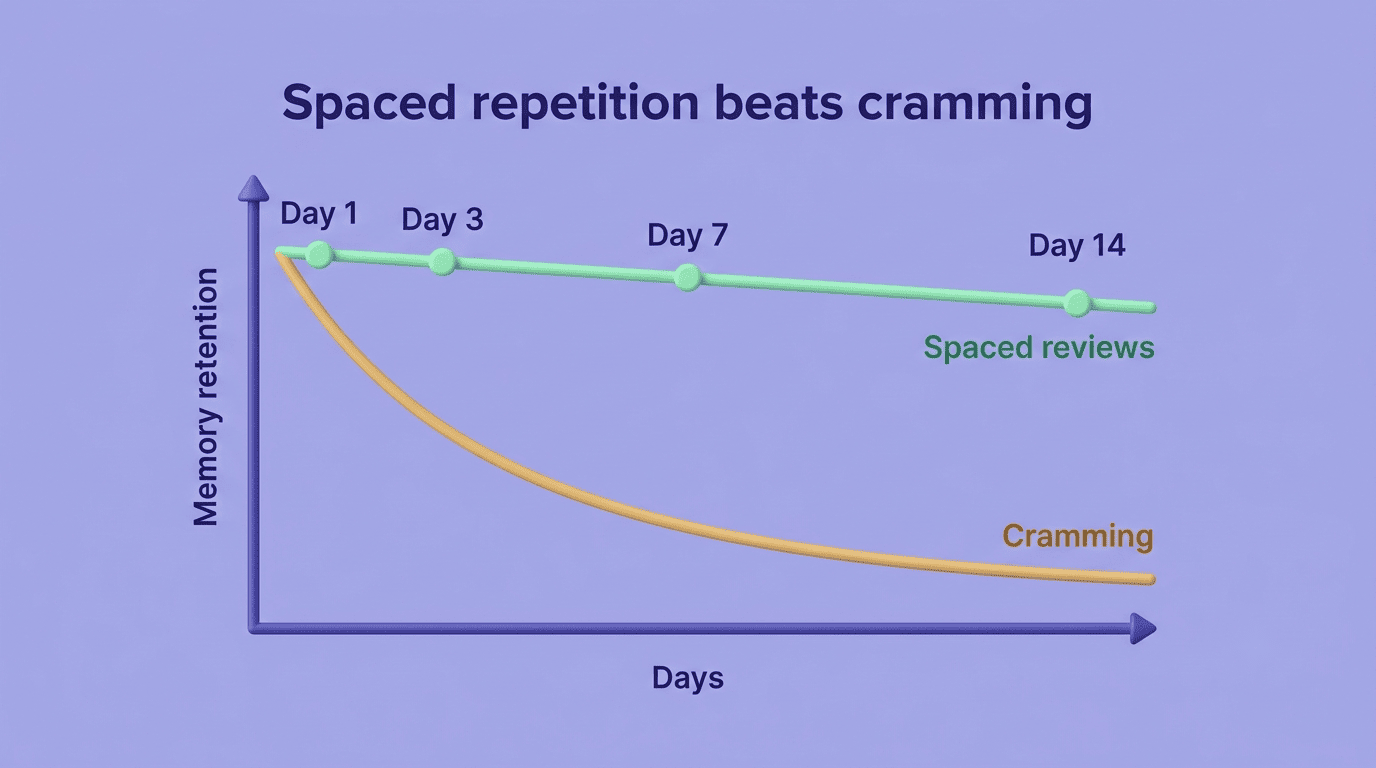
Active recall means testing yourself — with flashcards or practice questions — rather than passively re-reading a textbook chapter. This is sometimes called the testing effect, and it consistently outperforms re-reading in controlled studies; see the testing effect entry on Wikipedia. A planner that’s actually useful builds retrieval practice directly into sessions instead of just blocking off «review chapter 4» time.
Focus in blocks, often structured around the Pomodoro Technique, breaks a study session into short, timed stretches of concentration separated by real breaks. Working in 25-to-50-minute blocks with deliberate pauses guards against the burnout that comes from open-ended «study for three hours» sessions, and a planner that respects this structure will space breaks into the schedule automatically rather than leaving it to the student to remember.
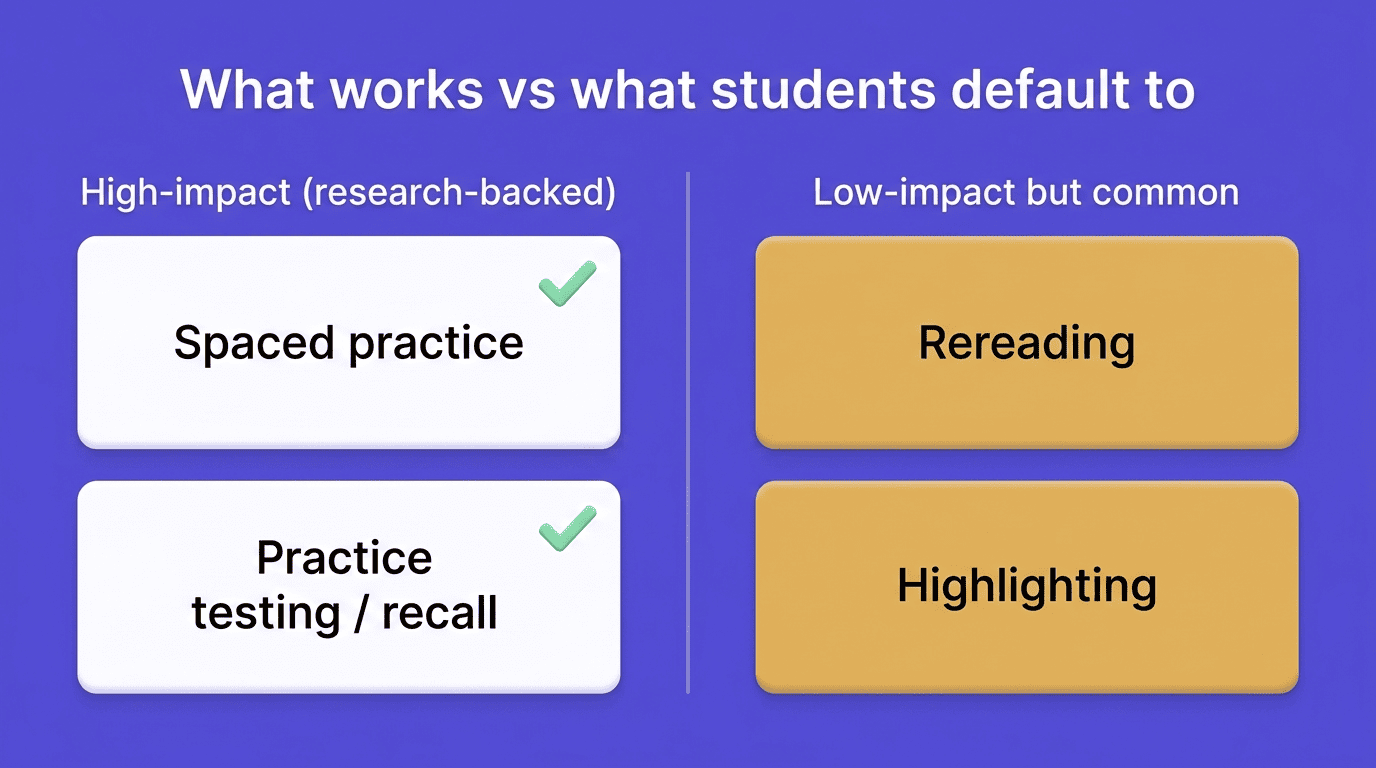
A widely cited review of ten common learning techniques by cognitive psychologist John Dunlosky and colleagues rated distributed practice (spaced repetition) and practice testing (active recall) as the two highest-utility strategies out of the ten they examined — well ahead of habits like rereading and highlighting, which most students actually default to. That gap between what works and what students tend to do by default is exactly what a planner built around these principles is meant to close.
How to Build a Study Plan with AI (a Simple Workflow)
Getting a useful plan out of any AI study planner comes down to a short, repeatable sequence:
- Collect your subjects and exam dates. List every class along with its test, quiz, or paper deadlines.
- Enter honest available hours. Overestimating free time is the single fastest way to sabotage the plan before it starts.
- Choose a schedule style. Most tools offer variations like Balanced, Intensive, Spaced Repetition, or Deadline-Focused, depending on how much runway is left.
- Set an outcome for each session. A flashcard deck, a practice quiz, or a page of notes — something concrete you can check off.
- Follow the plan for a few days. Treat the first attempt as a draft, not a contract.
- Reschedule when life interferes. A missed session should trigger an automatic reshuffle, not guilt.
A capable AI study assistant helps at nearly every one of those steps — explaining a topic you’re stuck on, generating flashcards from your notes, or building a practice quiz on demand. But the planner organizes the work and the tutor explains it; neither one studies the material for you. Writing the answer, working the problem, and actually understanding the concept is still on you.
Weekly, Semester, and Exam-Countdown Plans
Not every study plan should look the same, because the time horizon changes what a realistic daily load looks like.
| Plan type | Typical duration | Daily load |
|---|---|---|
| Semester plan | 8-16 weeks | 1-2 hours/day |
| Finals / exam countdown | 1-3 weeks | 3-5 hours/day |
| Long-range spaced review | 1-6 months | 30-90 minutes/day |
A semester-long plan spreads coursework thin across the whole term, so daily load stays modest and sustainable. An exam-countdown plan compresses the same material into a shorter, more intense window when a specific test is close. A long-range spaced plan — useful for material like a foreign language or a standardized test — keeps a light daily touch running for months so nothing has time to fully fade between reviews. Picking the right horizon comes down to what’s actually on the calendar:
- Full semester ahead with no imminent test → semester plan
- One exam inside the next three weeks → exam-countdown plan
- Ongoing material like vocabulary or board-exam content → long-range spaced review
Balancing Multiple Classes Without Burning Out
Most students aren’t studying for one exam in isolation — they’re juggling three or four classes with overlapping deadlines, and that’s where a planner earns its keep. It runs a priority ranking by urgency and by where a student is weakest, rather than splitting time evenly across subjects regardless of need. When two exams land in the same week, it triages — putting more sessions on the harder or higher-stakes test rather than pretending both deserve identical attention.
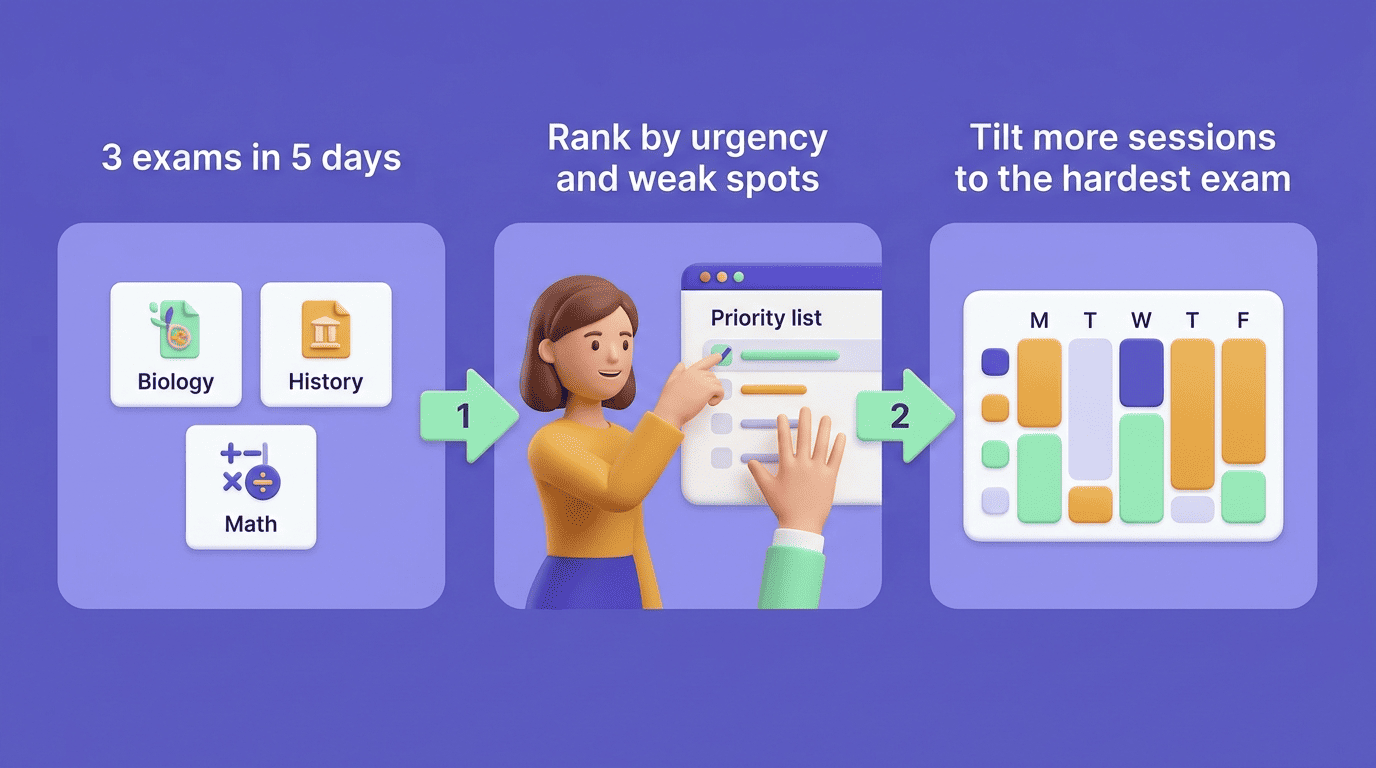
When a student falls behind on one subject, a capable planner re-plans automatically instead of quietly letting the backlog pile up. Picture three exams landing within five days of each other: a naive planner would give each subject equal time and leave the hardest exam under-prepared; a good one would tilt hours toward the subject with the weakest current grasp while still keeping the other two on track. That kind of triage is hard to do consistently by hand at 11 p.m. on a Tuesday, which is exactly where an AI study assistant is most useful.
Common Study-Planning Mistakes AI Helps You Avoid
Most bad study weeks trace back to the same handful of errors, and a decent planner is built specifically to catch them.
- Underestimating how long tasks take. This is a well-documented pattern known as the planning fallacy — students routinely predict tasks will take less time than they do — and a planner that learns from actual completion rates adjusts future sessions accordingly.
- Planning for an idealized version of yourself. A schedule built for eight focused hours a day rarely survives its first Tuesday; realistic capacity limits prevent the whole plan from collapsing at once.
- Skipping review sessions. It’s easy to drop a flashcard review when it feels optional; a planner treats reviews as scheduled events, not afterthoughts.
- Marathon sessions instead of spaced ones. A single six-hour cram block is far less effective than the same six hours split across several days.
- Zero buffer time. A plan with no slack breaks the first time something unexpected comes up — and something always does.
Free and Honest: Using AI the Right Way
Plenty of solid AI study planners are free to use and don’t require creating an account, which lowers the barrier for a student who just wants to try one before an exam. What matters more than price is where the line sits:
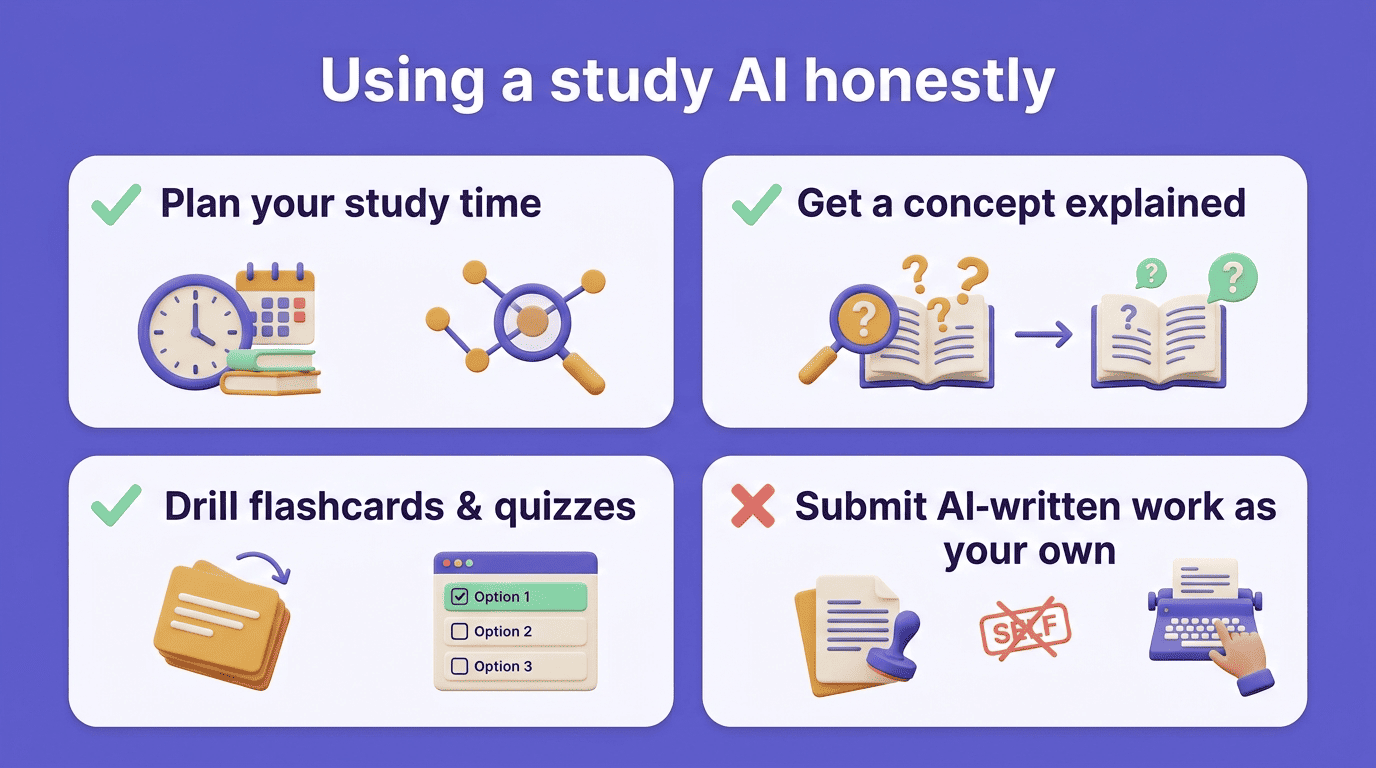
- Planning your time and building a realistic schedule — fine
- Getting a concept explained in plain language — fine
- Drilling your memory with AI-generated flashcards or quizzes — fine
- Submitting AI-generated writing or worked answers as your own — not fine
Passing off something you didn’t actually produce or understand is academic dishonesty, and it falls squarely under most schools’ academic integrity policies.
Every university publishes its own version of that line, and it’s worth reading before assuming a tool is fair game for a given assignment. MIT’s academic integrity guidelines are a useful example of how one school draws the boundary between legitimate support and dishonest work.
Honesty is the foundation of good academic work.
MIT Academic Integrity Handbook
A study AI app built the right way helps you plan, explain, and rehearse the material — the understanding, and the work you turn in, still has to be yours.