Free AI Study Tools: What You Actually Get (and How to Use Them Honestly)
Free AI study tools turn your notes, slides, and readings into summaries, flashcards, and practice quizzes without a subscription. A free study AI gives you those core learning features on a no-cost tier, and the U.S. Department of Education’s Office of Educational Technology has flagged how quickly AI tools have moved into everyday student workflows. The part worth knowing before you sign up: «free» almost always means a free tier with limits, not an unlimited product, and a tool built to hand you finished answers is a liability to your grade, not a shortcut to it.

This guide covers what these tools actually do for free, where the paywall usually sits, how to pick an honest one, and — most importantly — how to use them to learn instead of to cheat.
What free AI study tools do
Most free tiers cover the same handful of essentials. None of this requires you to understand machine learning — you upload material, and the tool restructures it into something you can actually study from:
- Summarizing a PDF, textbook chapter, or lecture recording into plain-language notes
- Auto-generating flashcards from that material
- Building practice quizzes with multiple-choice and short-answer questions
- Explaining a hard concept a different way when the textbook version doesn’t click
- Answering follow-up questions about your own uploaded material through an AI tutor
The core free features
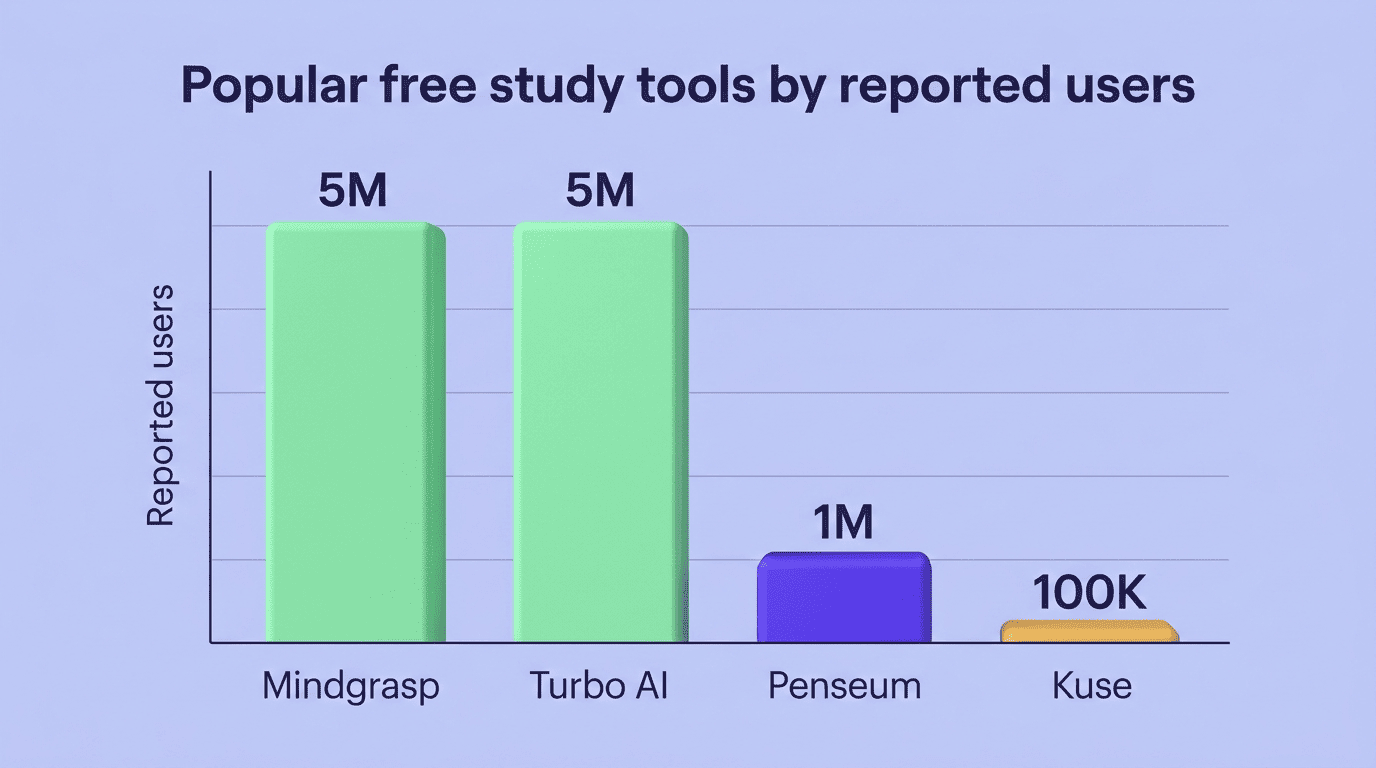
Adoption of these free features has grown fast across the study-AI category. A few tools disclose rough user counts publicly, which gives a sense of scale even though the numbers are self-reported and not independently audited:
| Tool | Reported users | Free-tier focus |
|---|---|---|
| Mindgrasp | 5M+ | Summaries, flashcards from lecture recordings |
| Turbo AI | 5M+ | Notes and flashcards from video/audio |
| Penseum | 1M+ | Study sets, practice quizzes |
| Kuse AI | 100k+ | Flashcards, quizzes, credit-based free tier |
The common thread: flashcards, practice quizzes, and summaries are the free-tier baseline across almost every study AI assistant on the market, not a premium extra.
Turn your own material into study sets
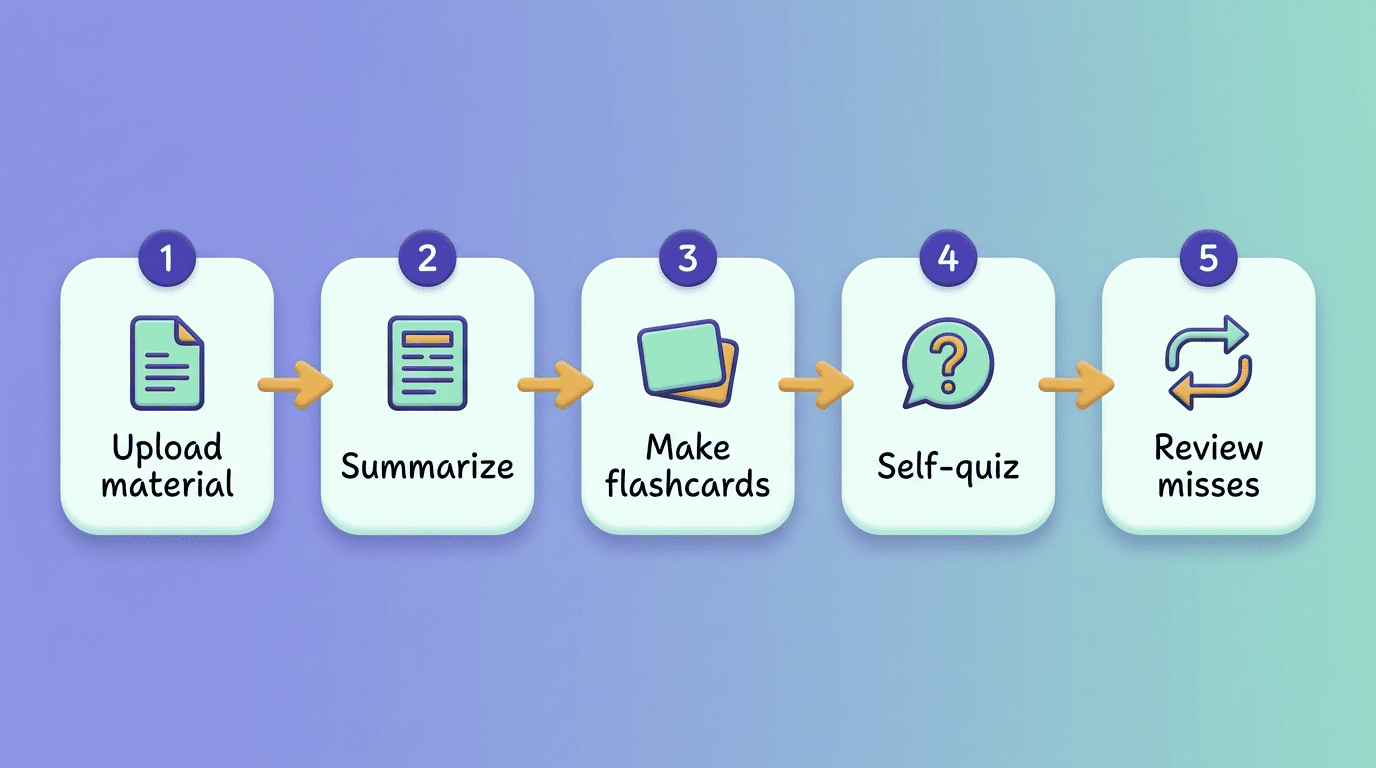
The best free workflow starts with your course material, not generic web content: upload the professor’s slides or your own notes, get a plain-language summary, then drill flashcards built from that summary. Working from your own readings — rather than searching for pre-made answers — is what keeps this inside the honest, learning-first use of a study AI assistant.
This also produces better study material than searching the web for a pre-made deck, since the flashcards and quiz questions line up with exactly what your instructor covered, not a generic version of the topic that might skip the details your exam will actually test.
Free vs. paid: where the paywall usually sits
Core generation — summaries, flashcards, quizzes — is usually free, sometimes gated behind a starting pool of credits rather than a hard feature wall. Kuse AI, for example, advertises 1,800 free credits with no signup required, and Penseum offers free platform access with a separate $29.99 premium tier for heavier use. Evernote bundles a free study-AI chat feature directly into its free notes tier rather than charging separately for it.
Paywalls typically show up around volume and convenience rather than the core learning features themselves:
| What’s included | Free tier | Paid tier |
|---|---|---|
| Summaries, flashcards, quizzes | Usually yes | Yes |
| Number of uploads / credits | Capped | Higher or unlimited |
| File size / length limits | Small files, short lectures | Large files, long lectures |
| Processing speed | Standard | Priority |
| Exports and advanced quiz types | Often locked | Usually included |
Read the pricing page before you commit to a tool for a whole semester — a free tier that covers three uploads a week is fine for light review, but it will not carry you through exam season on its own. A few signals separate a genuinely free tier from one that’s free in name only:
- Core generation works without entering a credit card
- The credit or upload cap is disclosed up front, not discovered mid-semester
- File-size and length limits are stated in plain numbers, not «varies»
- Downgrading to free after a trial doesn’t lock you out of material you already uploaded
How to use them (without cheating)
The single biggest risk with any study AI isn’t the tool itself — it’s how you use the output. The same summarizer that helps you review your own notes can, in the wrong hands, turn into a way to skip the reading entirely. The line between the two is intent, not the software.
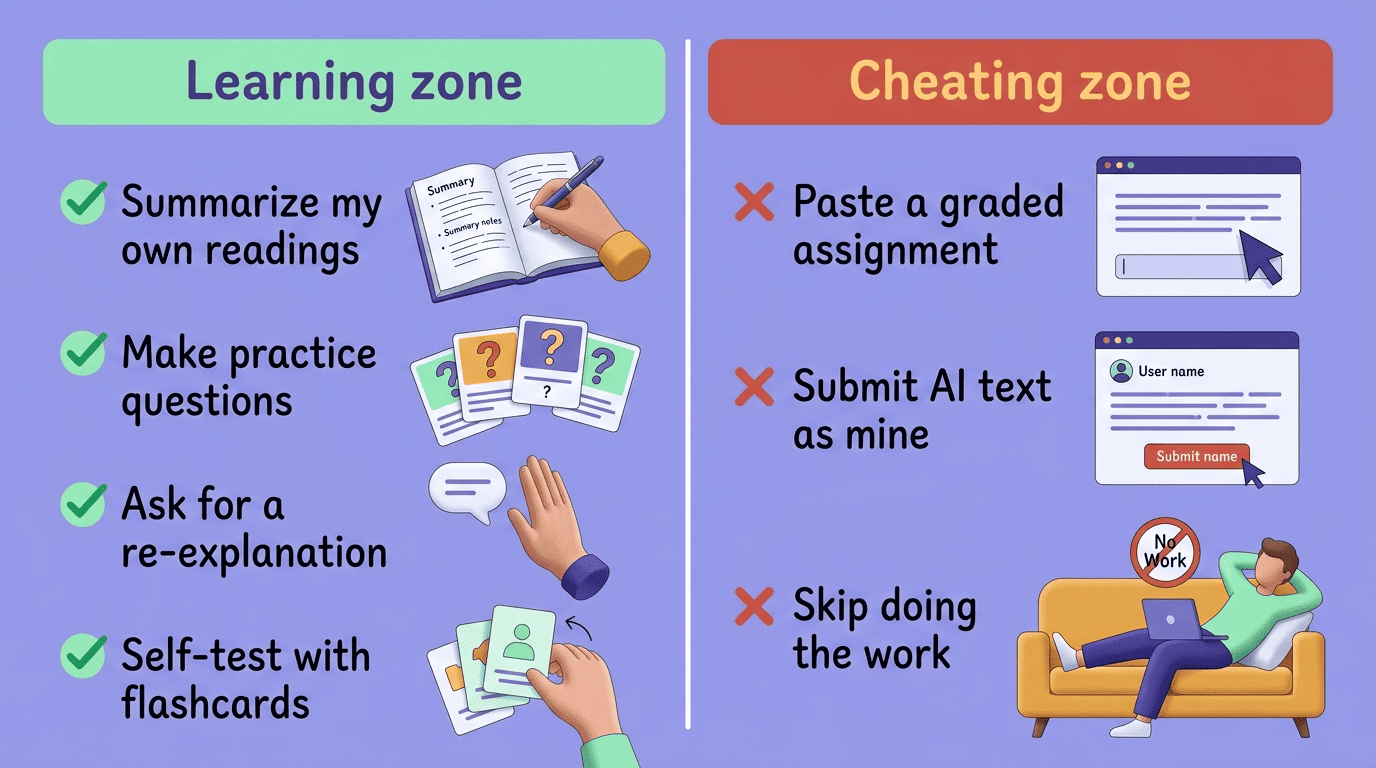
Learning zone vs. cheating zone
Here’s the practical split most academic-integrity offices draw, whether or not your syllabus spells it out:
- Green zone: summarizing your own readings, generating practice questions from your notes, asking the tool to re-explain a concept a different way, self-testing with flashcards before an exam.
- Red zone: pasting a graded assignment’s questions into a chatbot for answers, submitting AI-generated text as your own writing, using a «free homework help» tool to skip doing the work yourself.
That second category is where a lot of otherwise-useful «free homework help» tools push students without meaning to — a tool marketed around finishing assignments fast, rather than around understanding the material, nudges usage toward the red zone by design.
The International Center for Academic Integrity frames the underlying standard clearly:
Honesty, trust, fairness, respect, responsibility, and courage are the fundamental values of academic integrity.
International Center for Academic Integrity
Those same six values are what separate a flashcard generator used to review your own reading from the same tool used to generate an essay you turn in as your own.
Check the course policy first
Free doesn’t mean allowed. The U.S. Department of Education’s Office of Educational Technology has recommended that schools keep a «human in the loop» when AI tools are involved in learning and assessment, which in practice means the decision about what counts as acceptable use sits with your instructor and your school, not with the tool’s marketing page.
Read your syllabus and your school’s academic-integrity policy before you rely on any AI tool for graded work. Policies vary a lot between courses — one professor might welcome AI-generated practice quizzes for review, while another bans any AI involvement in an assignment entirely. When a specific use case isn’t covered by the written policy, ask the instructor directly rather than guessing.
How to choose a free AI study tool
Not every «free» tool is built the same way, and the differences matter more than the price tag once you’re relying on one for a whole semester.
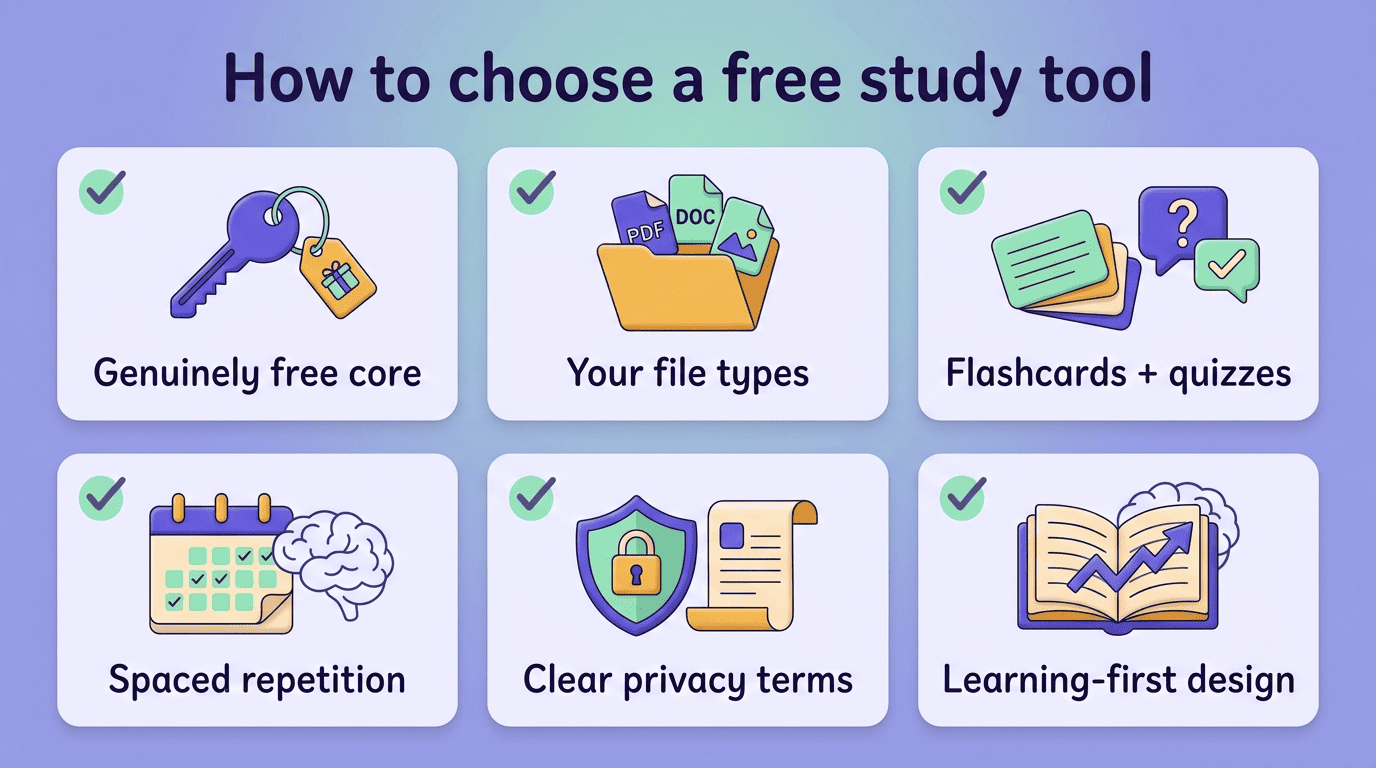
Genuinely free core features. Check that summaries, flashcards, and quizzes work without a credit card on file — some tools require payment info up front even for a «free» trial, which is a signal worth noticing.
Support for your actual file types. A tool that only ingests plain text won’t help much if your course material is all PDF slide decks or recorded lectures; confirm the formats you’ll actually use before you invest time building study sets.
Both flashcards and quizzes, not just one. Flashcards are good for recall, but practice quizzes test whether you can apply the concept under exam-like conditions — a tool that only does one leaves a gap.
Spaced-repetition scheduling. Spaced repetition, a learning technique with decades of cognitive-science research behind it, reviews material at increasing intervals right before you’re likely to forget it. A free tool that schedules flashcards this way gets you more retention per hour of review than one that just shows you a static deck.
Clear privacy terms. Look for a plain-language explanation of how your uploaded notes and files are stored and whether they’re used to train other models.
Learning-first design over «beat the assignment» marketing. Avoid tools that advertise doing your homework for you or getting past AI-detection software — that framing is a reliable signal you’re looking at a red-zone tool, not a study aid.
A few marketing phrases are worth treating as red flags on their own:
- «Get answers instantly» with no mention of explanations or sources
- «Beat AI detectors» or «undetectable AI writing»
- «Finish your assignment in minutes»
- No visible privacy policy or terms of service
Getting the most out of a free tier
A free tier goes a lot further when you follow a consistent routine instead of using the tool randomly the night before an exam. Active recall — testing yourself instead of re-reading notes — is one of the best-documented study techniques in cognitive-science research, and it’s exactly what flashcards and quizzes are built for.
- Upload your own material — lecture slides, your notes, or a reading — rather than searching for a pre-made summary online.
- Generate a summary and skim it once to confirm the tool captured the right concepts.
- Build a flashcard deck from the summary, focused on definitions and relationships, not full sentences.
- Take a practice quiz to test recall under light pressure, not just recognition.
- Review the questions you missed and ask the AI tutor to re-explain each one a different way.
- Space your review sessions out over several days instead of cramming them into one sitting.
- Try teaching a missed concept back in your own words — if you can’t, go back to the source material, not the AI’s explanation.
Repeating that loop with a study AI assistant across a semester builds real retention, not just a stack of flashcards you never open again.